> ## Documentation Index
> Fetch the complete documentation index at: https://seal-d2ca5bea.mintlify.site/llms.txt
> Use this file to discover all available pages before exploring further.
# Change sets
> To review and publish any entities, they must go through a Change Set process.
# What is a change set?
A Change Set is a collection of drafts and related entities undergoing changes together. This ensures that related changes are grouped together, reviewed comprehensively, and published in sync.
 ## What can be part of a change set?
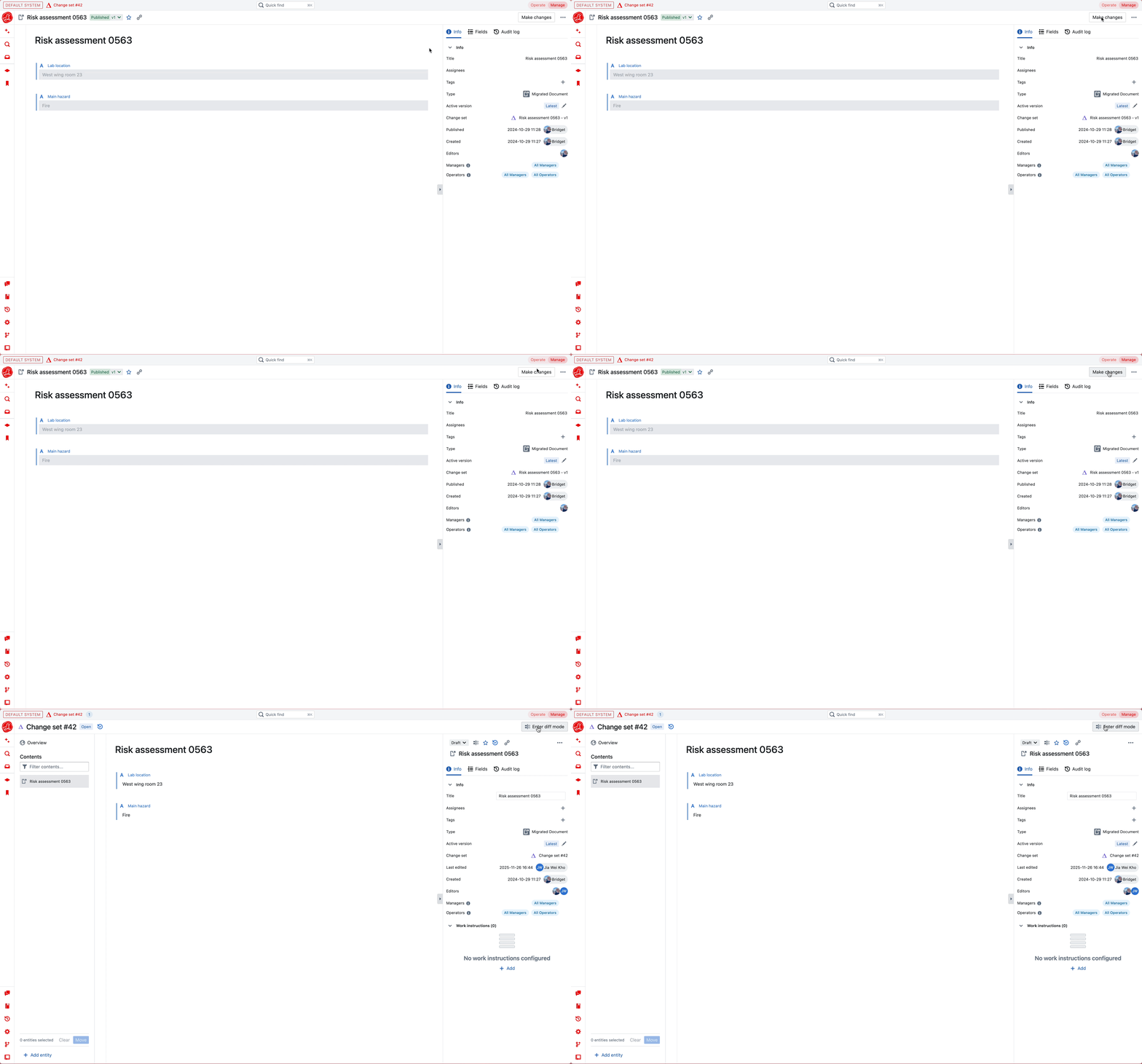
Whenever a draft is created, it is automatically assigned to a change set and all edits are made within that change set.
## What can be part of a change set?
Whenever a draft is created, it is automatically assigned to a change set and all edits are made within that change set.
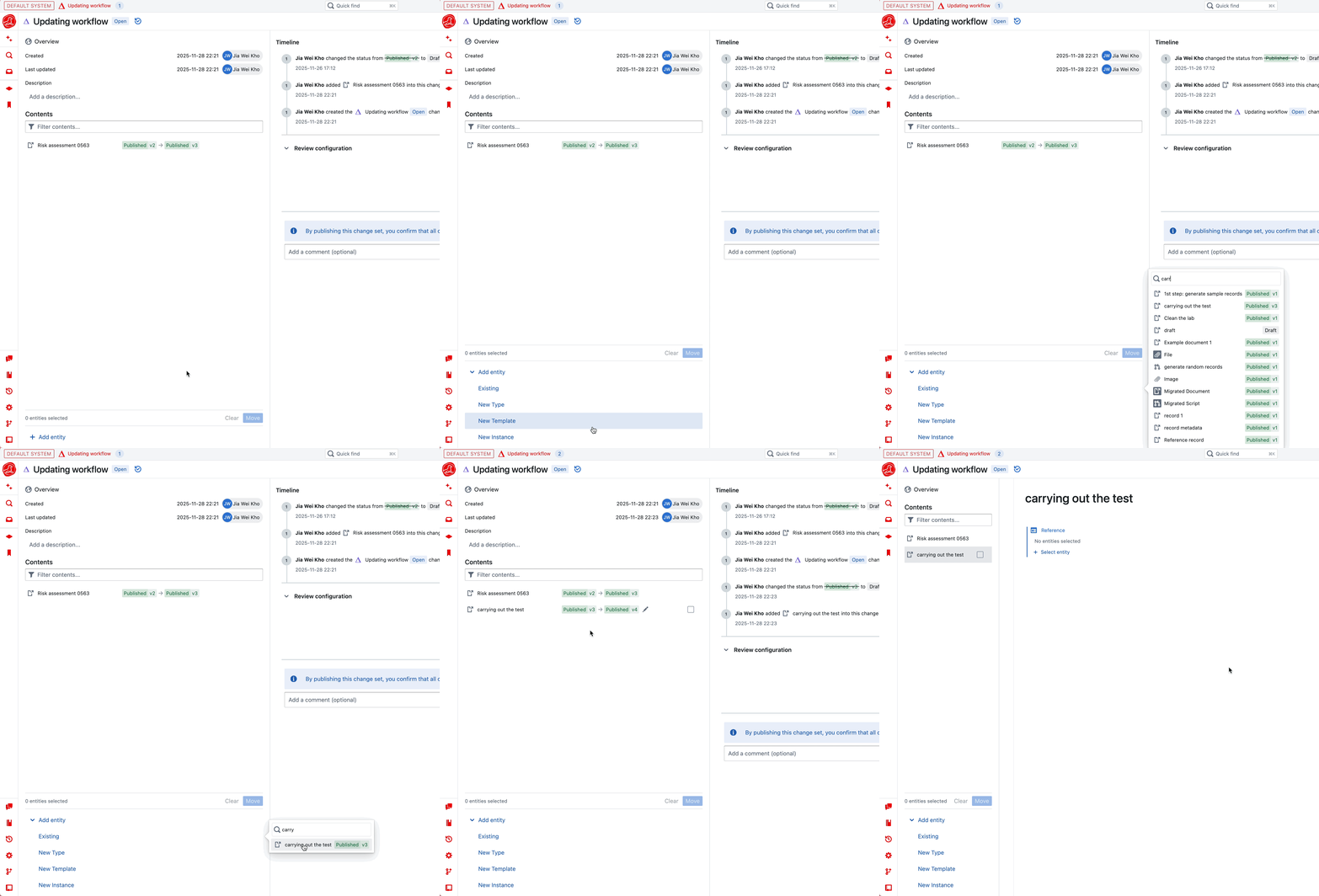
 A Change Set can consist of one standalone entity or multiple related entities. Add entities using the plus symbol, where you can add an existing entity or create a new one.
* Adding an **existing draft entity** will move it to this change set.
* Adding a **published entity** will create a new draft of that entity in this change set.
Note that submitted entities belong to the same change set as their parent entity.
A Change Set can consist of one standalone entity or multiple related entities. Add entities using the plus symbol, where you can add an existing entity or create a new one.
* Adding an **existing draft entity** will move it to this change set.
* Adding a **published entity** will create a new draft of that entity in this change set.
Note that submitted entities belong to the same change set as their parent entity.
 ### Reviewing and publishing
To review and publish any entity, it *must* go through a change set process.
All entities in the same change set are reviewed together — all review requirements from included entities are combined.
Learn more about Review Requirements [here](/change-control/review-requirements-and-checks).
### Reviewing and publishing
To review and publish any entity, it *must* go through a change set process.
All entities in the same change set are reviewed together — all review requirements from included entities are combined.
Learn more about Review Requirements [here](/change-control/review-requirements-and-checks).
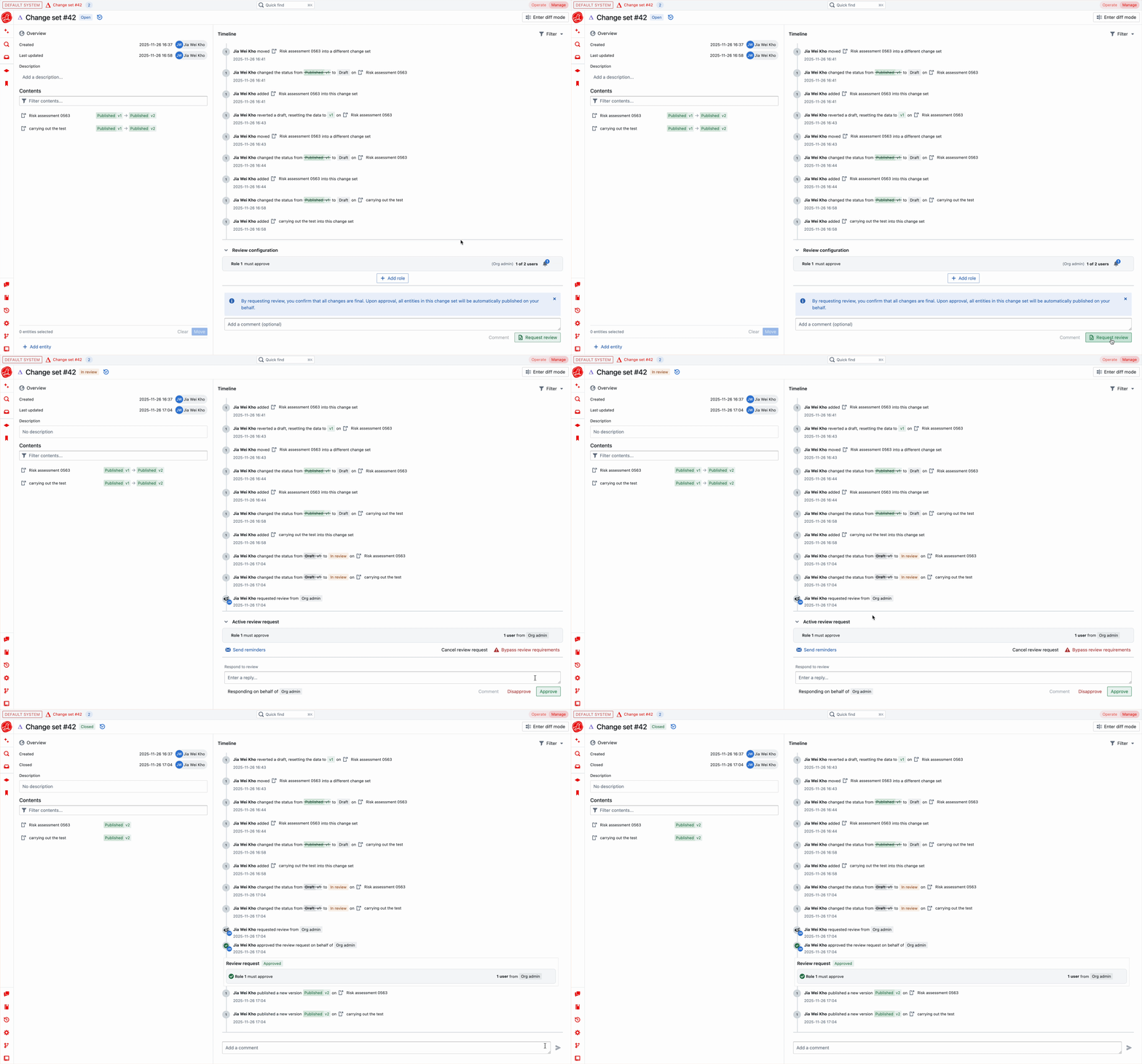 An approval is required for all review conditions before publishing. When a change set is approved, all included entities are published at the same time.
### Delayed activation
Delayed activation is available only on orgs with the **Delayed SOP Activation** feature enabled. Contact your Seal admin if you need it switched on.
Some regulated workflows — particularly SOPs and policies — need a soak window between **publication** and **becoming the active version**. The new version is available for training and review the moment it's published, but day-to-day work keeps following the prior version until the soak window elapses.
**At publish time** — in the publish dialog, each entity whose type allows it (instances and templates) shows a **Delay activation** toggle and a days input. Tick the entities that should soak; siblings activate immediately as usual. The default soak window is configurable on the org's organisation config (`sopActivationDelayDays`).
**During the soak window** — the new version exists as `pending_activation`. Its training requests target the new version, but `Active vX` on the entity still points at the prior version. A clock-icon banner appears on the entity page showing when auto-activation is scheduled.
**First publish (v1)** — delaying the *first* published version of an entity leaves it with no active version at all until the soak elapses. Training routes to v1 immediately, but users who only have view access can't open the entity yet — to them it doesn't exist as an active document until the cron (or an "Activate now" override) promotes it.
**Adjustments after publish** — only admins (org admin or system admin of the entity's system) can use the three buttons on the pending-activation banner. Operators can publish into a soak window, but only an admin can bypass or reshape it once published:
* **Activate now** — promote the new version immediately, skipping the rest of the soak window.
* **Extend +7 days** — push the auto-activation date further out (useful if reviewers need more time).
* **Cancel auto-activation** — clear the schedule entirely. The entity keeps its prior active version indefinitely, until an admin activates manually or a later change set publishes a new version.
Every adjustment — and the eventual activation itself — is recorded in the audit trail with the acting user, the reason (`auto_activate_after_soak` vs `manual_soak_override`), and the originating change set, so the soak window is fully traceable for compliance reviews.
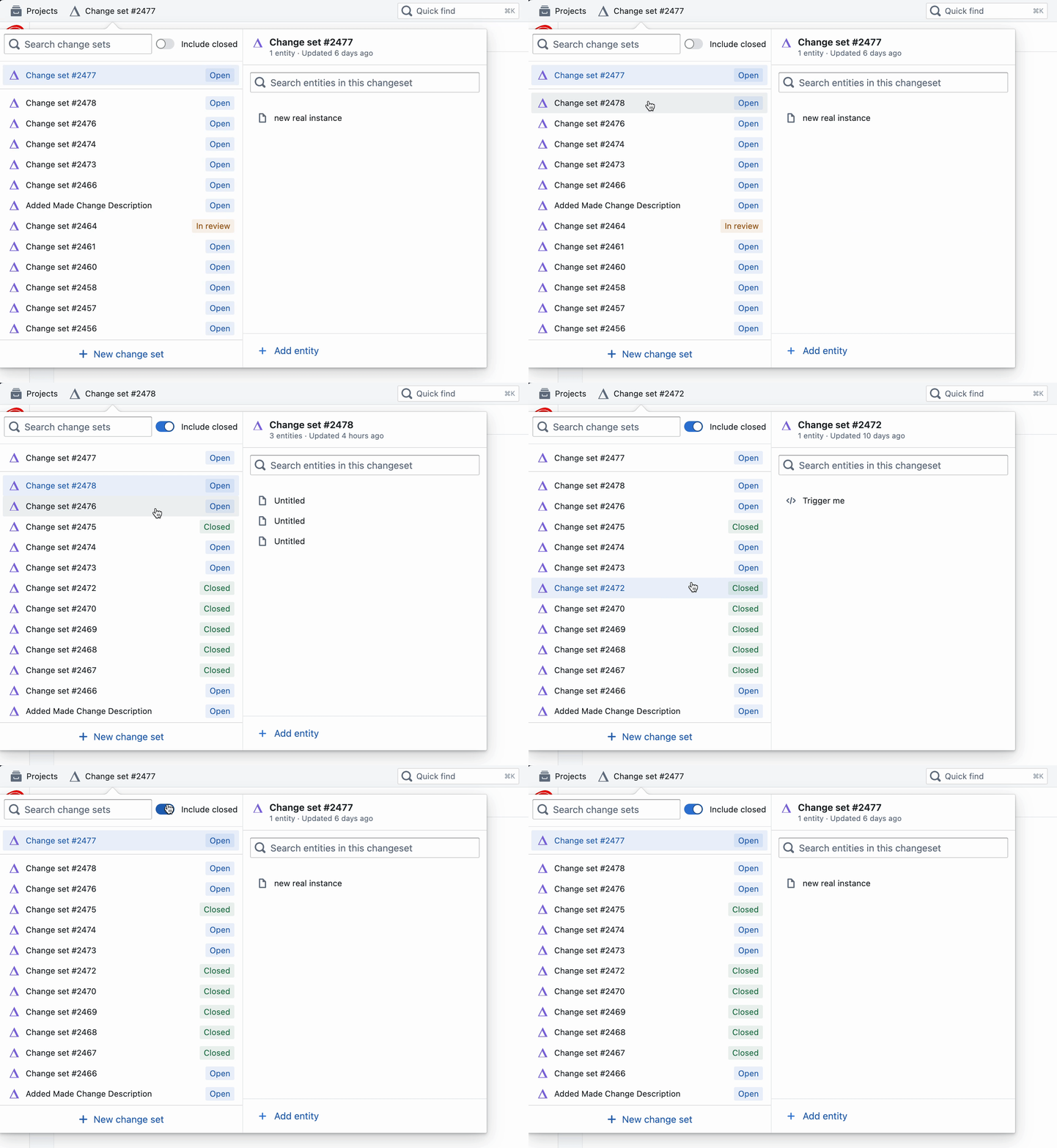
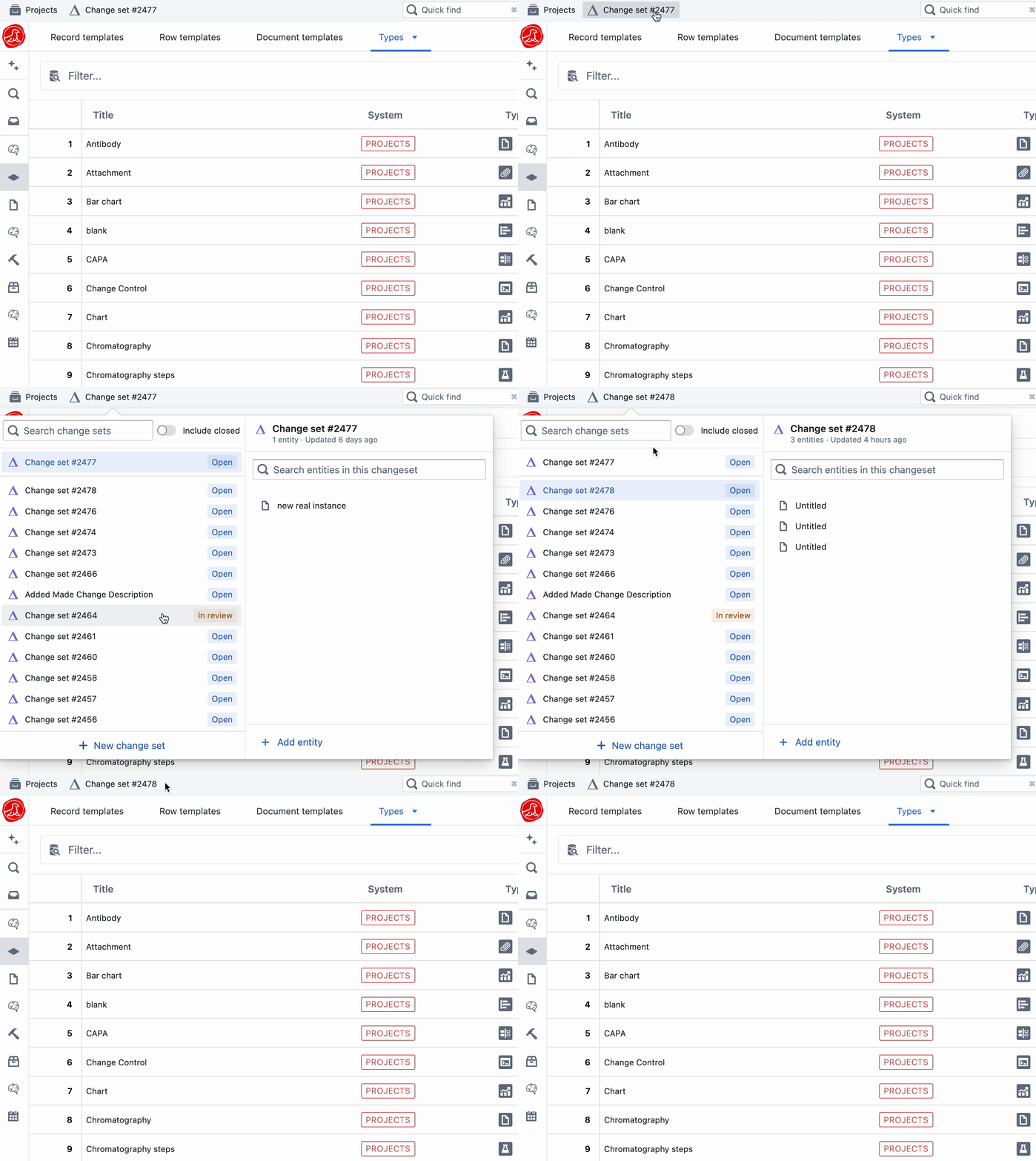
### Viewing all change sets
View all change sets from the tab in the top bar.
An approval is required for all review conditions before publishing. When a change set is approved, all included entities are published at the same time.
### Delayed activation
Delayed activation is available only on orgs with the **Delayed SOP Activation** feature enabled. Contact your Seal admin if you need it switched on.
Some regulated workflows — particularly SOPs and policies — need a soak window between **publication** and **becoming the active version**. The new version is available for training and review the moment it's published, but day-to-day work keeps following the prior version until the soak window elapses.
**At publish time** — in the publish dialog, each entity whose type allows it (instances and templates) shows a **Delay activation** toggle and a days input. Tick the entities that should soak; siblings activate immediately as usual. The default soak window is configurable on the org's organisation config (`sopActivationDelayDays`).
**During the soak window** — the new version exists as `pending_activation`. Its training requests target the new version, but `Active vX` on the entity still points at the prior version. A clock-icon banner appears on the entity page showing when auto-activation is scheduled.
**First publish (v1)** — delaying the *first* published version of an entity leaves it with no active version at all until the soak elapses. Training routes to v1 immediately, but users who only have view access can't open the entity yet — to them it doesn't exist as an active document until the cron (or an "Activate now" override) promotes it.
**Adjustments after publish** — only admins (org admin or system admin of the entity's system) can use the three buttons on the pending-activation banner. Operators can publish into a soak window, but only an admin can bypass or reshape it once published:
* **Activate now** — promote the new version immediately, skipping the rest of the soak window.
* **Extend +7 days** — push the auto-activation date further out (useful if reviewers need more time).
* **Cancel auto-activation** — clear the schedule entirely. The entity keeps its prior active version indefinitely, until an admin activates manually or a later change set publishes a new version.
Every adjustment — and the eventual activation itself — is recorded in the audit trail with the acting user, the reason (`auto_activate_after_soak` vs `manual_soak_override`), and the originating change set, so the soak window is fully traceable for compliance reviews.
### Viewing all change sets
View all change sets from the tab in the top bar.
 ## Bulk migrate change sets
When you bulk migrate a set of entities — for example, applying the same field update across every instance of a template — Seal records the whole migration in **one** change set. That keeps the review and the e-signature atomic: one approval covers every entity the migration touches.
Some of the targets may already be open as drafts in someone else's change set. Seal handles this without splitting the migration. Those targets are added to the migration as **pending patches**: the migration records the operations it wants to run, but doesn't touch the other draft until the migration is published. When you publish the migration:
* If the other draft has since been published, the patch promotes to a new draft inside the migration and ships as part of the same release.
* If the other draft is still open, the patch is applied into it — the holder's next publish carries the migration's changes.
* If the other draft is in review when you publish, the migration's publish is blocked. Resolve the review first, then retry.
* If the entity has been archived, the patch is skipped.
### Migration change-set sidebar
A migration's change set splits its contents list into two sections:
* **Publishing draft** — targets that the migration owns directly and will ship when you publish.
* **Pending patches** — targets currently drafted elsewhere. Each row carries a tag describing what the publish will do: *will promote* if the holder draft is gone, *→ CS-N (Author)* if the patch will apply into another change set (click the badge to jump there), *⊗ archived* if the target was archived, or *⛔ blocked CS-N* if the holder is in review.
Drag the divider between the two sections to resize them — the ratio is remembered the next time you open the change set.
Click any pending-patch row to preview its target read-only. Above the list, a **View intent** row opens the full operation chain the migration will apply.
### Pending changes on an entity
Whenever a bulk migration has queued a change against an entity, that entity's **Info** tab shows a **Pending changes** section at the top. Each pending migration appears as a card listing the operations it will run, with a link to the migration change set. If your draft is in review or the entity is archived, the card adds a short warning explaining what will happen when the migration publishes.
This makes it easy to see, from the entity, every in-flight migration that will affect it — without having to open each migration's change set.
## Bulk migrate change sets
When you bulk migrate a set of entities — for example, applying the same field update across every instance of a template — Seal records the whole migration in **one** change set. That keeps the review and the e-signature atomic: one approval covers every entity the migration touches.
Some of the targets may already be open as drafts in someone else's change set. Seal handles this without splitting the migration. Those targets are added to the migration as **pending patches**: the migration records the operations it wants to run, but doesn't touch the other draft until the migration is published. When you publish the migration:
* If the other draft has since been published, the patch promotes to a new draft inside the migration and ships as part of the same release.
* If the other draft is still open, the patch is applied into it — the holder's next publish carries the migration's changes.
* If the other draft is in review when you publish, the migration's publish is blocked. Resolve the review first, then retry.
* If the entity has been archived, the patch is skipped.
### Migration change-set sidebar
A migration's change set splits its contents list into two sections:
* **Publishing draft** — targets that the migration owns directly and will ship when you publish.
* **Pending patches** — targets currently drafted elsewhere. Each row carries a tag describing what the publish will do: *will promote* if the holder draft is gone, *→ CS-N (Author)* if the patch will apply into another change set (click the badge to jump there), *⊗ archived* if the target was archived, or *⛔ blocked CS-N* if the holder is in review.
Drag the divider between the two sections to resize them — the ratio is remembered the next time you open the change set.
Click any pending-patch row to preview its target read-only. Above the list, a **View intent** row opens the full operation chain the migration will apply.
### Pending changes on an entity
Whenever a bulk migration has queued a change against an entity, that entity's **Info** tab shows a **Pending changes** section at the top. Each pending migration appears as a card listing the operations it will run, with a link to the migration change set. If your draft is in review or the entity is archived, the card adds a short warning explaining what will happen when the migration publishes.
This makes it easy to see, from the entity, every in-flight migration that will affect it — without having to open each migration's change set.