> ## Documentation Index
> Fetch the complete documentation index at: https://seal-d2ca5bea.mintlify.site/llms.txt
> Use this file to discover all available pages before exploring further.
# Active versions
Active Versions allows users to control which version of an entity is considered "**active**" within the system.
An active version of an entity is one that is currently **in use** and **is effective**.
Users will always be pointed to the active version of an entity, in a reference field.
By default, an entity's active version is automatically the latest published version *("Latest").*
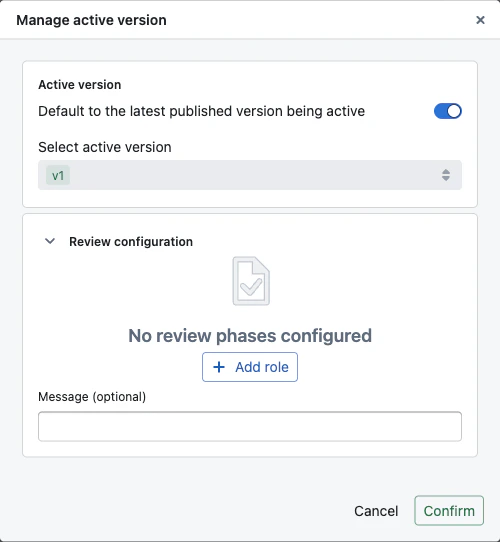
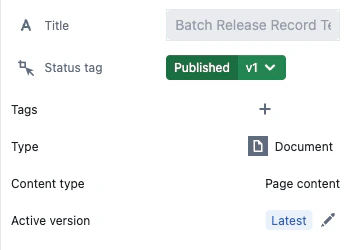 If necessary, users have the option to select a specific version as the active version, which will not automatically update when newer versions are published. In this case, the *latest published version* ≠ active version.
 On the query page, users can decide what type of data to query using the `mode:` filter:
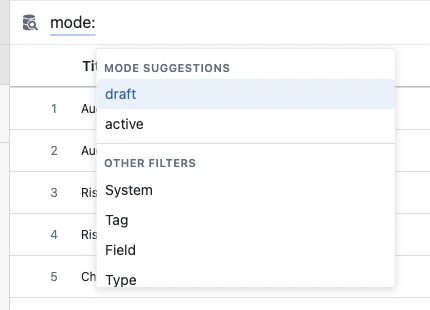 * **active** - queries the published snapshot of each entity (or a specific pinned version, if set). Entities that have never been published are excluded by default.
* **draft** - queries the current state of every entity, including drafts, in-review versions, and unpublished changes.
### What "active" data includes
`active` mode shows the published snapshot of every entity — title, fields, and status reflect the values at publish time. If an entity is reopened for editing, those fields still show the published values until the next publish.
**Status tags are always live**, in every mode — the column shows the entity's current lifecycle, never the pinned snapshot. To filter on the pinned published tag instead, use the **Active status** filter.
[Live fields](/entity-content/fields#live-fields) follow the same rule — fields marked live always show their current value. The `draftExists` flag on each result indicates whether an open draft is present.
## Comparing versions
You can compare any two versions of an entity to see what changed between them.
To enter diff mode, open the **three-dot menu** (⋯) on any entity and select **Enter diff mode**. The page will show a comparison banner at the top with two version selectors — click either to change which versions you are comparing.
### What the comparison shows
* **Documents** — inline highlights showing added (green), removed (red), and modified (blue) content directly in the document
* **Scripts** — line-by-line code diff with added and removed lines highlighted
* **Files** — side-by-side preview of the old and new file with version labels
* **Charts, custom content** — a summary indicator showing that content changed
For all entity types, a **Changes tab** appears in the right sidebar during comparison. This tab shows:
* **Field changes** — which fields were added, removed, or modified, with old and new values side by side
* **Property changes** — title, permissions, review requirements, and configuration changes
* **Automation changes** — inline script code diff with context collapsing, showing only the lines around each change
* **active** - queries the published snapshot of each entity (or a specific pinned version, if set). Entities that have never been published are excluded by default.
* **draft** - queries the current state of every entity, including drafts, in-review versions, and unpublished changes.
### What "active" data includes
`active` mode shows the published snapshot of every entity — title, fields, and status reflect the values at publish time. If an entity is reopened for editing, those fields still show the published values until the next publish.
**Status tags are always live**, in every mode — the column shows the entity's current lifecycle, never the pinned snapshot. To filter on the pinned published tag instead, use the **Active status** filter.
[Live fields](/entity-content/fields#live-fields) follow the same rule — fields marked live always show their current value. The `draftExists` flag on each result indicates whether an open draft is present.
## Comparing versions
You can compare any two versions of an entity to see what changed between them.
To enter diff mode, open the **three-dot menu** (⋯) on any entity and select **Enter diff mode**. The page will show a comparison banner at the top with two version selectors — click either to change which versions you are comparing.
### What the comparison shows
* **Documents** — inline highlights showing added (green), removed (red), and modified (blue) content directly in the document
* **Scripts** — line-by-line code diff with added and removed lines highlighted
* **Files** — side-by-side preview of the old and new file with version labels
* **Charts, custom content** — a summary indicator showing that content changed
For all entity types, a **Changes tab** appears in the right sidebar during comparison. This tab shows:
* **Field changes** — which fields were added, removed, or modified, with old and new values side by side
* **Property changes** — title, permissions, review requirements, and configuration changes
* **Automation changes** — inline script code diff with context collapsing, showing only the lines around each change