> ## Documentation Index
> Fetch the complete documentation index at: https://seal-d2ca5bea.mintlify.site/llms.txt
> Use this file to discover all available pages before exploring further.
# Query
> Filter and search entities in Seal.
The query functionality in Seal provides powerful filtering and querying capabilities to help you find exactly what you need.
## Filtering
Query filter suggestions will show as a dropdown as soon as you click into the search bar. Filter suggestions will narrow down as you type. After a filter is selected, values that can be selected are suggested.
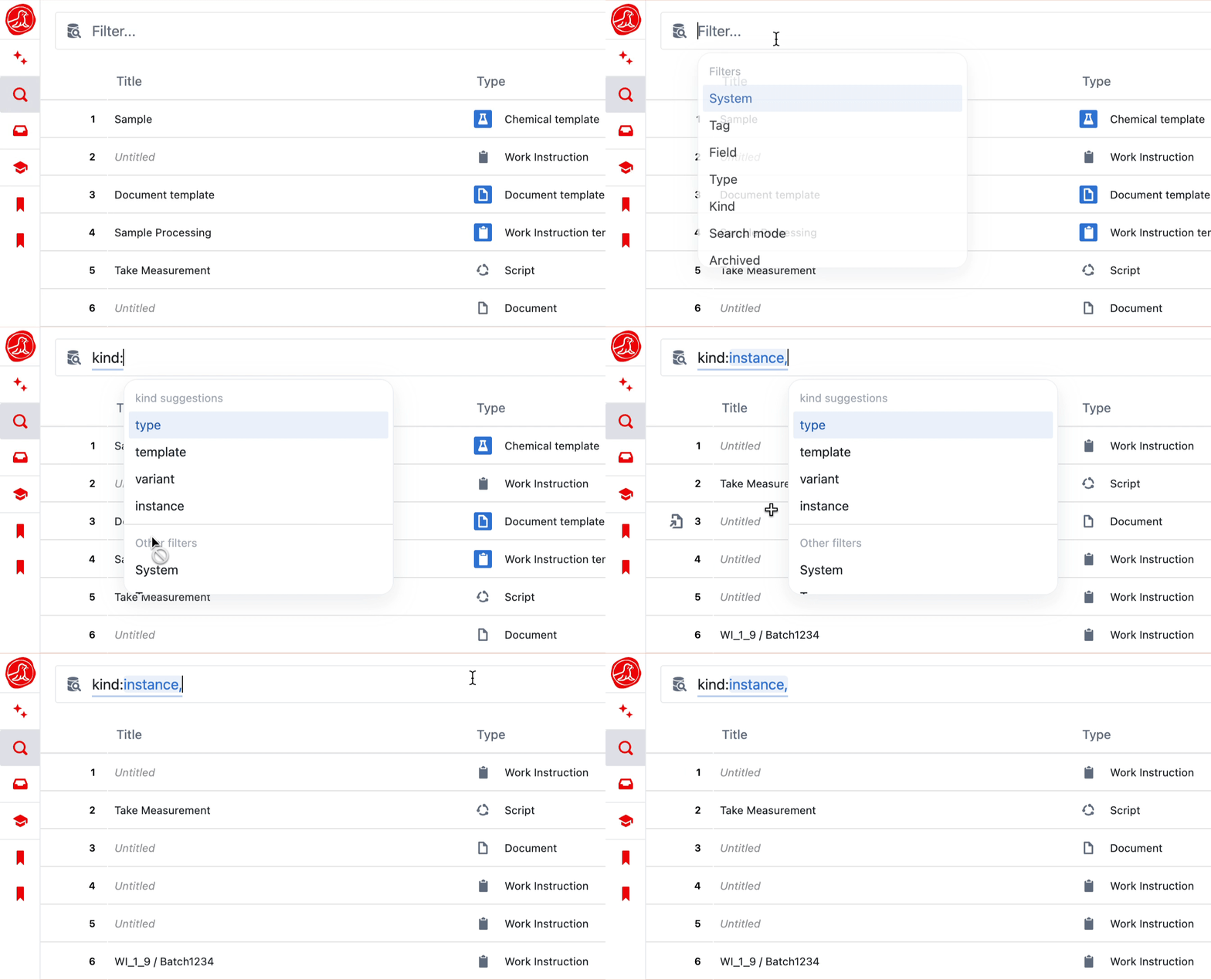 If a filter is not provided, entities will be searched by title.
The filter options are explained in more detail below.
| Filter | Options | Description |
| -------------------- | ------------------------------------ | -------------------------------------------------------------------------------------------------------------------------------------------------------------------------------------------------------------------------------------------------------------------------------------------------------------------------------------------------------------------------------------------------------------------------------------------------------------------------------------------------------------------------------------------------------------------------------- |
| System | | The system an entity belongs to. |
| Tag | | Any entities which have the tag. |
| Field | | Any entities which contain the field. |
| Type | | |
| Kind | `type`, `template`, `record` | Returns entities of the given type. |
| Mode | `draft`, `active` | `draft` returns the latest state of every entity, including drafts and unpublished changes. `active` returns the published snapshot of each entity — title, fields, and status come from the published version. Status tag is the exception: it is **always** the live value in both modes, so views never lie about an entity's current lifecycle. [Live fields](/entity-content/fields#live-fields) similarly always reflect the current state. Entities that have never been published are excluded by default. See [Active versions](/entities/active-versions) for details. |
| Archived | `true`, `false` | |
| Status | `editable` , `in review`, `finished` | Filters entities by status. In `active` mode this is the published status; in `draft` mode it's the current draft status. |
| Status tag | | Filters entities by status tag. Always matches the **live** status tag (current draft value), in both `active` and `draft` modes — the value shown in views. Use **Active status** below to filter by the pinned published value instead. |
| Active status | | Filters by the status tag that was set when the active version was published. Use this when you want to query the published value independently of the current draft state — for example, "every entity that shipped as Approved, regardless of whether it has since been reopened". |
| Template | | Returns instances created from a given template. |
| Template version | | When used with a `template` filter, only instances from the specific version of the template will be returned. |
| Has trigger | `true`, `false` | Shows entities with automation code that have at least one trigger set up. |
| Created by | | Returns entities that were created by the given user. |
| Last updated by | | Returns entities where the last change was made by the given user. |
| Assignees | | Returns entities that are assigned to the user. |
| Submitted from | | Shows instances that were submitted **from** the given entity. |
| Created between | | Returns entities that were created between the input dates. Formats:
If a filter is not provided, entities will be searched by title.
The filter options are explained in more detail below.
| Filter | Options | Description |
| -------------------- | ------------------------------------ | -------------------------------------------------------------------------------------------------------------------------------------------------------------------------------------------------------------------------------------------------------------------------------------------------------------------------------------------------------------------------------------------------------------------------------------------------------------------------------------------------------------------------------------------------------------------------------- |
| System | | The system an entity belongs to. |
| Tag | | Any entities which have the tag. |
| Field | | Any entities which contain the field. |
| Type | | |
| Kind | `type`, `template`, `record` | Returns entities of the given type. |
| Mode | `draft`, `active` | `draft` returns the latest state of every entity, including drafts and unpublished changes. `active` returns the published snapshot of each entity — title, fields, and status come from the published version. Status tag is the exception: it is **always** the live value in both modes, so views never lie about an entity's current lifecycle. [Live fields](/entity-content/fields#live-fields) similarly always reflect the current state. Entities that have never been published are excluded by default. See [Active versions](/entities/active-versions) for details. |
| Archived | `true`, `false` | |
| Status | `editable` , `in review`, `finished` | Filters entities by status. In `active` mode this is the published status; in `draft` mode it's the current draft status. |
| Status tag | | Filters entities by status tag. Always matches the **live** status tag (current draft value), in both `active` and `draft` modes — the value shown in views. Use **Active status** below to filter by the pinned published value instead. |
| Active status | | Filters by the status tag that was set when the active version was published. Use this when you want to query the published value independently of the current draft state — for example, "every entity that shipped as Approved, regardless of whether it has since been reopened". |
| Template | | Returns instances created from a given template. |
| Template version | | When used with a `template` filter, only instances from the specific version of the template will be returned. |
| Has trigger | `true`, `false` | Shows entities with automation code that have at least one trigger set up. |
| Created by | | Returns entities that were created by the given user. |
| Last updated by | | Returns entities where the last change was made by the given user. |
| Assignees | | Returns entities that are assigned to the user. |
| Submitted from | | Shows instances that were submitted **from** the given entity. |
| Created between | | Returns entities that were created between the input dates. Formats:
`YYYY-MM-DD HH:mm to YYYY-MM-dd HH:mm`
`after YYYY-MM-DD HH:mm`
`before YYYY-MM-DD HH:mm` |
| Last updated between | | Returns entities that were last updated between the input dates. Formats:
`YYYY-MM-DD HH:mm to YYYY-MM-dd HH:mm`
`after YYYY-MM-DD HH:mm`
`before YYYY-MM-DD HH:mm` |
| References | | Returns entities that reference the given entity. Use this to find all entities whose reference fields point to a specific entity (backlink query). |
| Change set | | Filters for entities belonging to the given change set by index. The change set index can be found in the URL on a change set page. |
A query string is made up of multiple filter groups separated by *spaces*. Inside a filter group, separated by *commas*, filters are `OR`ed together whilst different filter groups are `AND`ed together.
For example, the query below will return:
* Any entities that were created by Bridget **OR** are type Document **OR** Record
* **AND** were created after 1st September 2025
 ### Field value filters
The `field` filter can also match entities by the **value** of a specific field using the syntax `field:`. This is useful for filtering by text, number, select, or entity reference field values.
**Syntax:** `field:`
| Operator | Description | Supported field types |
| -------- | ------------------------ | --------------------- |
| `=` | Equal to | All field types |
| `>` | Greater than | Number fields only |
| `<` | Less than | Number fields only |
| `>=` | Greater than or equal to | Number fields only |
| `<=` | Less than or equal to | Number fields only |
**Quoting rules:**
* Field names containing spaces must be wrapped in double quotes: `field:"Part Number"=value`
* Values containing spaces must also be wrapped in double quotes: `field:Status="In Progress"`
* Single-word field names and values do not need quotes: `field:Number=2000`
**Examples:**
```
field:Number=2000
field:Number>1000
field:Age<=30
field:"Field Name"="value with spaces"
type:Sample field:Number=2000 status:FINISHED
```
#### Entity reference values
To filter by an entity reference field (a field whose value points to another entity), use the `ref()` wrapper around the entity's ID.
**Syntax:** `field:=ref()`
The entity ID inside `ref()` must **not** be wrapped in quotes. Use `ref(abc-123)`, not `ref("abc-123")`.
**Examples:**
```
field:"Part Number"=ref(c91c1a8a-1234-5678-9abc-def012345678)
field:Reference=ref(a0b1c2d3-e4f5-6789-abcd-ef0123456789)
```
You can find an entity's ID in the URL when viewing it, or by copying it from the entity's detail page.
### Negated filters
Currently, the `type`, `statusTag`, and `activeStatus` filters can be negated by adding a `-` before the filter name. This will return any entities that do **not** match the filter. They can be combined with other filters in the same way.
### Field value filters
The `field` filter can also match entities by the **value** of a specific field using the syntax `field:`. This is useful for filtering by text, number, select, or entity reference field values.
**Syntax:** `field:`
| Operator | Description | Supported field types |
| -------- | ------------------------ | --------------------- |
| `=` | Equal to | All field types |
| `>` | Greater than | Number fields only |
| `<` | Less than | Number fields only |
| `>=` | Greater than or equal to | Number fields only |
| `<=` | Less than or equal to | Number fields only |
**Quoting rules:**
* Field names containing spaces must be wrapped in double quotes: `field:"Part Number"=value`
* Values containing spaces must also be wrapped in double quotes: `field:Status="In Progress"`
* Single-word field names and values do not need quotes: `field:Number=2000`
**Examples:**
```
field:Number=2000
field:Number>1000
field:Age<=30
field:"Field Name"="value with spaces"
type:Sample field:Number=2000 status:FINISHED
```
#### Entity reference values
To filter by an entity reference field (a field whose value points to another entity), use the `ref()` wrapper around the entity's ID.
**Syntax:** `field:=ref()`
The entity ID inside `ref()` must **not** be wrapped in quotes. Use `ref(abc-123)`, not `ref("abc-123")`.
**Examples:**
```
field:"Part Number"=ref(c91c1a8a-1234-5678-9abc-def012345678)
field:Reference=ref(a0b1c2d3-e4f5-6789-abcd-ef0123456789)
```
You can find an entity's ID in the URL when viewing it, or by copying it from the entity's detail page.
### Negated filters
Currently, the `type`, `statusTag`, and `activeStatus` filters can be negated by adding a `-` before the filter name. This will return any entities that do **not** match the filter. They can be combined with other filters in the same way.
 ## Sorting
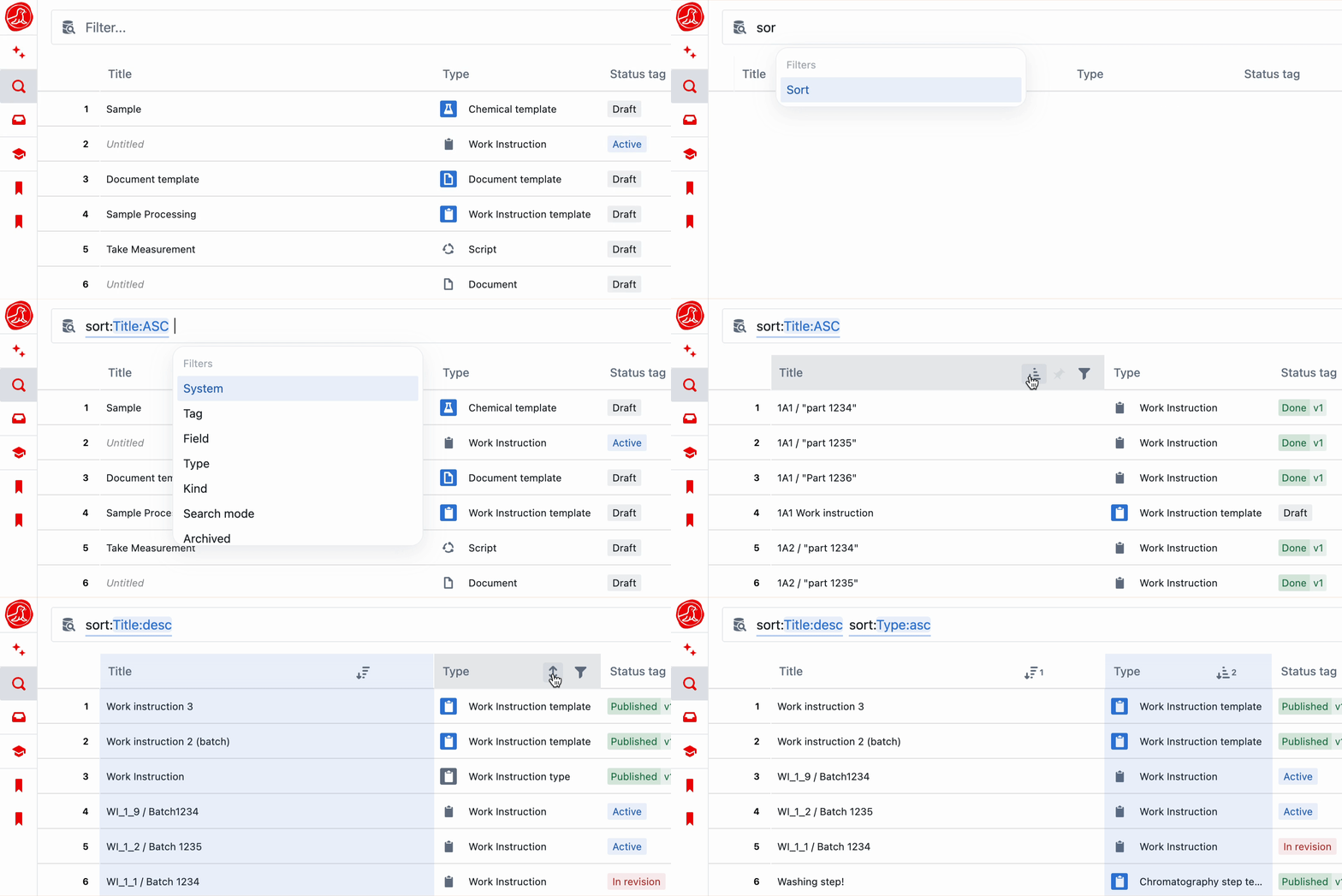
Results can be sorted by using the `sort:` keyword in your query or by clicking on the vertical arrows icon in a row header. Columns can be sorted ascending or descending and multiple sorts can be applied in sequence.
## Sorting
Results can be sorted by using the `sort:` keyword in your query or by clicking on the vertical arrows icon in a row header. Columns can be sorted ascending or descending and multiple sorts can be applied in sequence.
 # Saved views
Queries can be saved as views accessible via 'View Groups' in the left navigation bar. Type in your query and select `Save as view`.
If a filter has been edited in a view, a blue dot will appear in the top right until the view is saved.
# Saved views
Queries can be saved as views accessible via 'View Groups' in the left navigation bar. Type in your query and select `Save as view`.
If a filter has been edited in a view, a blue dot will appear in the top right until the view is saved.
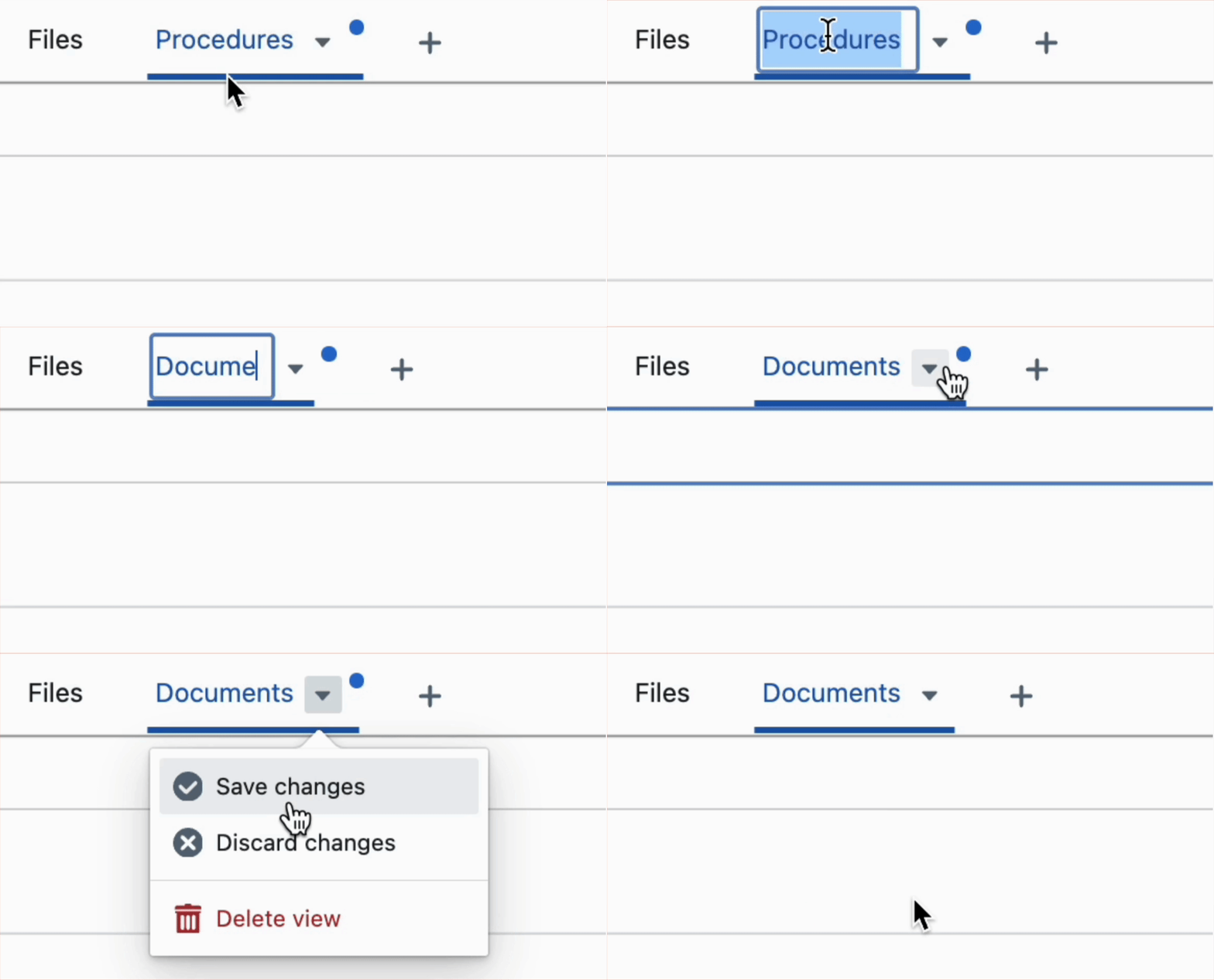 Manage your view groups directly in the Views tab: click the **+** button next to the search bar to add a new group, hover a group to reveal a three-dot menu for rename / new view / delete, and drag groups to reorder. (Group settings also remain available under **Settings → Systems → View groups**.)
## Creating entities from saved views
When a saved view includes a `kind:` or `template:` filter, a creation button appears in the footer and empty state of the results table. The button adapts to the view's filters:
| View filters | Button behaviour |
| ----------------------------------------- | ---------------------------------------------------------------------------------- |
| `kind:template` + `type:Name` | **New {Type}** — creates a new template of that type directly |
| `template:Name` (single template) | **New {Template}** — creates an instance from that template directly |
| `template:Name,Name` (multiple templates) | **New instance** dropdown — opens a picker to choose which template to create from |
| `kind:instance` + `type:Name` | **New {Type}** dropdown — opens a picker to choose which template to create from |
A `template:` filter on its own is sufficient — instance creation is implicit. A `type:` filter alone does not show a creation button; it must be combined with a `kind:` filter. Builder permissions are required to create templates; operator permissions or system membership are required to create instances.
## Charts from Saved Views
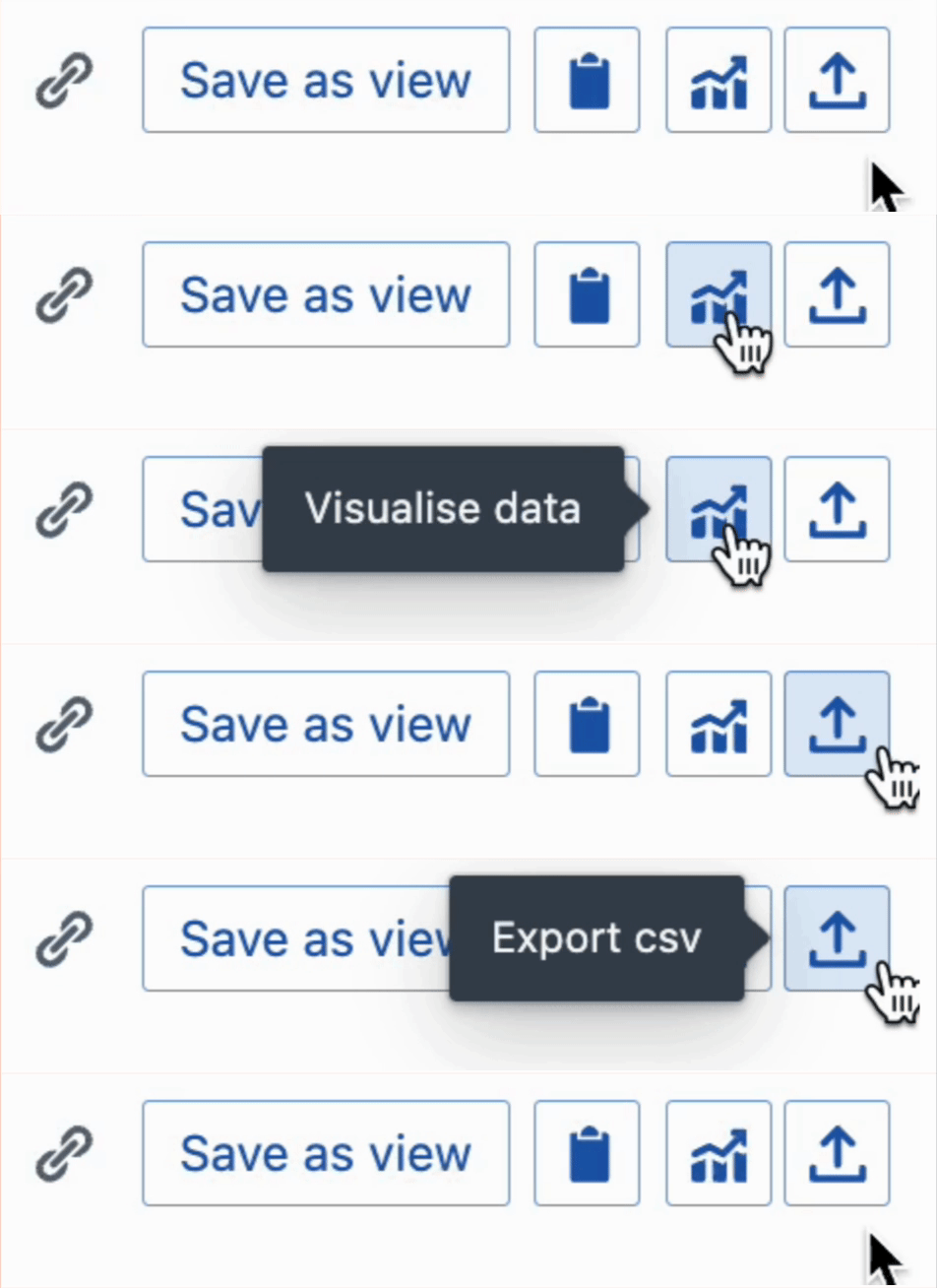
It is possible to create a [chart](/entity-content/charts) based on query results, and export your view as a CSV.
Manage your view groups directly in the Views tab: click the **+** button next to the search bar to add a new group, hover a group to reveal a three-dot menu for rename / new view / delete, and drag groups to reorder. (Group settings also remain available under **Settings → Systems → View groups**.)
## Creating entities from saved views
When a saved view includes a `kind:` or `template:` filter, a creation button appears in the footer and empty state of the results table. The button adapts to the view's filters:
| View filters | Button behaviour |
| ----------------------------------------- | ---------------------------------------------------------------------------------- |
| `kind:template` + `type:Name` | **New {Type}** — creates a new template of that type directly |
| `template:Name` (single template) | **New {Template}** — creates an instance from that template directly |
| `template:Name,Name` (multiple templates) | **New instance** dropdown — opens a picker to choose which template to create from |
| `kind:instance` + `type:Name` | **New {Type}** dropdown — opens a picker to choose which template to create from |
A `template:` filter on its own is sufficient — instance creation is implicit. A `type:` filter alone does not show a creation button; it must be combined with a `kind:` filter. Builder permissions are required to create templates; operator permissions or system membership are required to create instances.
## Charts from Saved Views
It is possible to create a [chart](/entity-content/charts) based on query results, and export your view as a CSV.