

- HPC co-location — analysis runs on a local cluster and data volumes make cloud transfer impractical between jobs
- Legacy network infrastructure — upload speeds genuinely limit cloud transfer of multi-terabyte data sets and upgrading connectivity is not feasible
- Regulatory mandate — a specific regulation or institutional policy requires certain data to remain on-premises (note: most data sovereignty requirements are satisfied by Seal’s regional hosting)
Architecture
In a hybrid deployment, Seal operates across three zones: Cloud (Seal Platform) — hosted on GCP:- Scientific workflows, experiment design, and execution records
- General metadata and GxP audit trails (metadata only — no sensitive data persisted)
- User management, search, dashboarding, and AI features
- API orchestration between cloud and local environments
- The Seal IoT agent runs on a local machine with access to your file stores and instruments. It watches for file events, computes checksums, and pushes metadata to Seal’s API over an encrypted connection. It’s the same IoT agent used for standard instrument data capture, configured to also handle file lifecycle tracking.
- Lab instruments output raw data to the local network as normal
- An embedded UI renders on-premises data and external tools inside the Seal interface via iFrame. Scientists access local data, analysis platforms, and other systems without leaving Seal. Traffic between the browser and local data stays entirely on the customer’s network.
- Large instrument files, sensitive data, and analysis outputs
- Managed by the customer’s infrastructure and security policies
- Seal references data by ID but never reads or stores the underlying content

Data should live in one place
The most important principle in a hybrid deployment: keep your on-premises data consolidated in a single, well-managed store — not scattered across instrument PCs, shared drives, and individual workstations. Seal is the single source of truth for what data exists, where it is, and what’s happened to it. If data lives on Seal (cloud), Seal manages it directly — storage, versioning, audit trails, search, and access control all work out of the box. If data stays on-premises, Seal stores references to that data (file paths, URIs, checksums) and maintains a complete event log of every change, movement, and access. The data never touches the cloud, but the audit trail does. Default to cloud. Reserve on-premises storage strictly for data that cannot leave your infrastructure. For data in external clouds (AWS S3, Azure Blob Storage, third-party SaaS), Seal stores a reference and tracks the lifecycle the same way — the experiment record holds the external URI, and every interaction is logged in Seal’s audit trail. Seal also supports real-time data streaming to external data warehouses (e.g. Snowflake) via Estuary. Raw data is streamed directly from the database — you’ll receive raw data blobs that are straightforward to restructure in your warehouse. See Infrastructure for details.Tracking on-premises data through Seal
When data stays on-premises, Seal needs to know about every file event — creation, movement, modification, deletion, and access. This is achieved through wrapper functions that perform the local file operation and log the event to Seal as a side effect. During implementation, we set up a thin integration layer (typically Python scripts using Seal’s SDK and REST API) that wraps your local file operations. Each wrapper function:- Performs the operation — moves, copies, or writes the file on the local network
- Computes a checksum — SHA-256 hash of the file before and after the operation
- Verifies integrity — confirms the checksum matches at the destination
- Logs to Seal — pushes an event to the experiment record via the API, including: file path, operation type, timestamp, operator, source and destination checksums, and success/failure status
Automated file watching
Most lab instruments output files to a network folder automatically — flow cytometers produce FCS files, sequencers produce FASTQ/BAM files, plate readers produce CSV exports, imaging systems produce TIFF stacks. The Seal IoT agent monitors these folders continuously. When a new file appears, the agent:- Matches it to the correct experiment record using configurable naming rules
- Computes and stores a checksum
- Logs the event to Seal (file created, location, size, hash, timestamp)
- Optionally uploads smaller files directly to Seal for cloud-based analysis
Reconciliation and accuracy checks
A periodic reconciliation job runs against the on-premises data store to verify that Seal’s records match reality:- Walks the data store and inventories every file (path, size, checksum)
- Compares the inventory against what Seal’s event log expects to be there
- Flags discrepancies: missing files, unexpected modifications (checksum mismatches), untracked files
- Logs the reconciliation result as an event in Seal
HPC and analysis tools
Seal integrates with local HPC clusters, desktop analysis tools, and cloud analysis platforms — without modifying your infrastructure and without data leaving the local network unless explicitly directed.- HPC clusters
- Desktop tools
- Cloud analysis
HPC jobs already write output to a known directory. The Seal IoT agent watches that directory. When results appear, the agent computes a checksum, matches the output to the correct experiment record, and logs the event to Seal.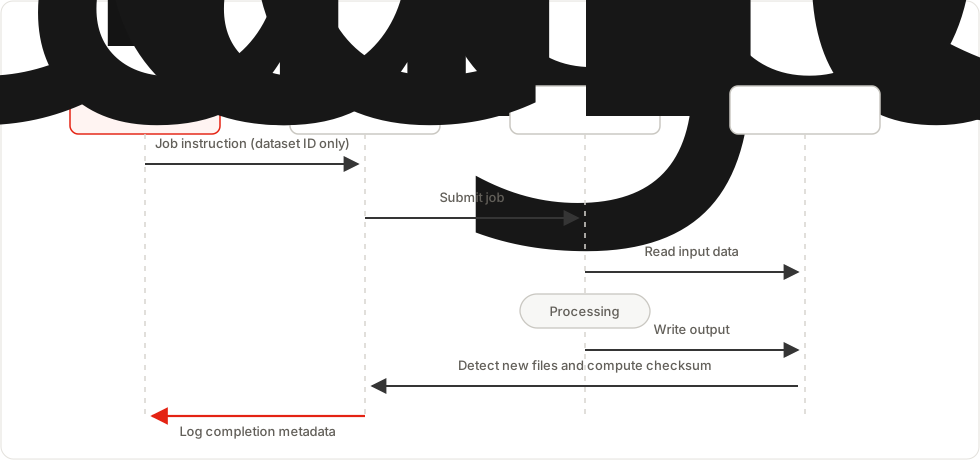

Integration methods
All of these ship as part of the standard platform:
Seal replaces spreadsheet registers, standalone freezer management, shared drive document management, and paper notebooks — one validated platform for inventory, storage, documents, and experiment records.
Seal integrates with specialist tools — instrument booking, colony management, analysis platforms, LIMS, and data archives render inside Seal via iFrame or connect via the REST API. Scientists access everything from one interface. Every interaction is logged as an event in the experiment timeline.
Data sovereignty
Designated data never leaves your infrastructure. Metadata stored in Seal’s cloud is strictly limited to system events, anonymised record IDs, and timestamps — no sensitive content. If your research involves patient or participant data, anonymise it before it enters Seal — store coded IDs, keep the linkage key in a separate system. See Handling confidential data for specific guidance on PII anonymisation. During implementation, we define a data classification model that determines exactly what goes to the cloud and what stays local, then enforce it through the IoT agent configuration and API wrapper rules.Security and compliance
Hybrid deployments maintain the same security posture as standard cloud deployments:- Seal cloud — SOC 2 Type II certified (report available on our security portal), with all standard encryption and network isolation controls
- Encrypted connectivity — all traffic between the IoT agent and Seal uses mutual TLS (mTLS). Seal issues and manages the client certificates via its own CA. Certificates auto-rotate on a fixed schedule; no manual key management required on your end.
- Zero-knowledge — Seal’s cloud never accesses sensitive data stored on-premises. Only metadata and reference IDs cross to the cloud.
- GxP compliance — e-signatures, version control, change sets, and ALCOA+ work identically across cloud and hybrid. Audit trails capture the full experiment lifecycle regardless of where data is physically stored.
Network requirements
The IoT agent initiates all connections — no inbound access to your network is required.Restricted and air-gapped networks
For segmented networks or strict firewall policies, the requirements above are all that’s needed — outbound HTTPS on port 443, no inbound rules. For air-gapped environments where no persistent outbound connection is available, the IoT agent operates in batch mode: file events are queued locally with full checksums and timestamps, then synced to Seal when a network window opens. If no network window is available, the agent exports event logs as signed JSON files for transfer via an approved data diode or removable media.What’s included vs. what’s custom
Here’s what ships today vs. what’s built during implementation:Responsibility boundary
IoT agent
The IoT agent is a lightweight process that runs on a standard machine (Windows, macOS, or Linux) on your network. It auto-updates as part of Seal’s standard release cycle, resumes automatically after downtime, and writes structured logs locally for SIEM forwarding. Agent status is monitored from the Seal admin dashboard. Contact support@seal.run for detailed IT specifications.Data export and portability
All data in Seal — experiment records, metadata, audit trails, file references, and event logs — is exportable in standard formats: PDF, DOCX, CSV, and JSON. This includes the full audit history and version chain for every record. For hybrid deployments, Seal’s API provides programmatic access to every record in the system. You can bulk-export your entire dataset at any time. Your on-premises data stays on your infrastructure and is never locked into Seal. Seal stores references and metadata only — the underlying files remain yours, on your hardware, in your formats.Implementation timeline
Hybrid configuration runs in parallel with the broader platform implementation (ELN, templates, training) — it does not extend the overall timeline.1
Week 1 — Data classification
Catalogue data sources. Define the classification model: what goes to cloud, what stays local. Document folder structures and naming conventions.
2
Week 2 — IoT agent deployment
Install the agent on a local machine. Configure file-watching rules for each instrument output folder. Compute initial checksums for existing data.
3
Week 3 — Integration build
API wrapper scripts for file lifecycle operations. HPC job submission integration if applicable. Reconciliation job configured and scheduled.
4
Week 4 — Validation
End-to-end testing: instrument output → IoT agent → Seal event log. Checksum verification across file movements. Reconciliation dry run. Audit trail review.